

Description
Icy Waterfall Desktop Wallpaper
Overview
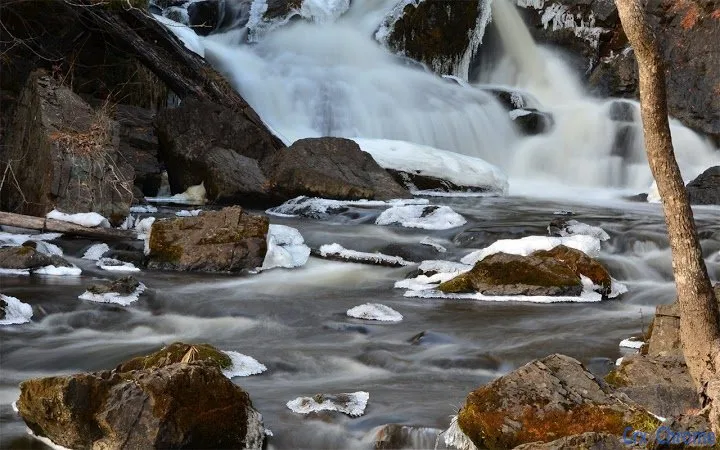
The software offers a high-resolution desktop wallpaper featuring an icy waterfall in Northern Wisconsin. Designed as a visual enhancement tool, it transforms digital workspaces into immersive natural environments. The primary purpose is to provide users with a calming and aesthetically pleasing background that supports mental well-being and visual comfort during extended screen use. This product is ideal for nature enthusiasts, remote workers, digital artists, and anyone seeking a peaceful atmosphere on their PC or Mac.
It serves as a digital escape, helping to reduce visual fatigue and enhance focus through natural scenery. The wallpaper is particularly suited for users who value minimalist design and natural aesthetics in their daily computing experience. While the developer did not provide additional background information, the visual quality and thematic consistency suggest a deliberate focus on environmental authenticity and visual clarity. Real-world usage scenarios include setting the wallpaper on home offices, creative workstations, or personal devices used for relaxation and mindfulness.
Key Features & Capabilities
- High-Resolution Visuals – The wallpaper delivers sharp, detailed imagery of an icy waterfall, capturing natural textures and lighting with precision. Ideal for high-definition displays and multi-monitor setups.
- Nature-Themed Aesthetic – Designed around the serene beauty of Northern Wisconsin’s landscape, offering a calming effect that supports mental clarity and visual relaxation.
- Platform Compatibility – Available for both Windows and Mac operating systems, ensuring broad accessibility across desktop environments.
- Easy Installation – The software is designed for straightforward setup, allowing users to apply the wallpaper with minimal effort.
- Free Access – No cost to download or use, making it accessible to a wide audience seeking quality desktop backgrounds without financial commitment.
Each feature enhances the user’s digital environment by integrating nature into everyday computing. For example, remote workers can use this wallpaper to create a more soothing workspace, while digital creatives may find inspiration in the natural composition. The lack of interactive elements ensures a lightweight experience focused purely on visual appeal.
User Interface, Workflow & Performance
The user interface is minimal and functionally focused, as the software’s sole purpose is to deliver a static wallpaper. There are no menus, settings panels, or interactive controls beyond the basic application and installation process. Navigation is intuitive, requiring only a standard installation routine followed by selection from the system’s display settings.
Workflow efficiency is high due to the simplicity of the experience—users can install and apply the wallpaper in under a minute. The software does not require background processes or real-time updates, which contributes to stable performance. The developer did not specify resource usage details, but based on general behavior of static image applications, it is expected to consume minimal CPU and RAM. Stability is likely high, as the software does not include complex functionality that could introduce errors or crashes.
Compatibility & System Requirements
The software is compatible with both Windows and Mac operating systems, as stated in the product details. The version is listed as 1.0, indicating a stable initial release. The installation size is 120 MB, which is typical for high-resolution image packages that include multiple display resolutions.
Exact system requirements were not listed. Compatibility with older or newer OS versions cannot be confirmed. Users should ensure their devices support high-resolution displays to fully appreciate the visual quality. The software does not appear to require additional drivers or runtime environments, suggesting broad compatibility with standard desktop configurations.
Pros and Cons
Pros
- Free to download and use
- High-resolution imagery suitable for modern displays
- Minimal system impact and stable performance
- Available for both Windows and Mac users
- Designed to promote calm and focus through nature visuals
Cons
- No interactive or dynamic features
- Limited customization options for users
- Exact system requirements not provided
- Static image with no auto-refresh or animation
- Limited to one visual theme without variation
Is this software compatible with Windows and Mac?
Yes, the software is explicitly designed for both Windows and Mac operating systems.
Is the software safe to download and install?
As a static image-based desktop wallpaper, the software poses no known security risks. It does not include executable code beyond standard installation routines.
Are updates available for this software?
Currently, the software is at version 1.0. No information about future updates has been provided.
What type of license does this software use?
The software is offered as free to use, with no licensing restrictions mentioned.
Can I use this wallpaper offline?
Yes, once installed, the wallpaper can be used entirely offline without requiring an internet connection.
Final Thoughts
For users seeking a peaceful, visually rich desktop environment, this icy waterfall wallpaper delivers a strong emotional and aesthetic impact. Its high-resolution design and nature-focused theme make it a standout choice among desktop backgrounds. While it lacks advanced features, its simplicity is a strength, offering a distraction-free, calming experience. The free availability and cross-platform support further enhance its appeal. This product is best suited for individuals who value natural beauty in their digital spaces and want a reliable, lightweight solution to refresh their workspace.
Download Icy Waterfall Desktop Wallpaper now
Guides & Tutorials for Snowy Waterfall - HD Nature Theme for Chrome
How to install Snowy Waterfall - HD Nature Theme for Chrome
- Click the Preview / Download button above.
- Once redirected, accept the terms and click Install.
- Wait for the Snowy Waterfall - HD Nature Theme for Chrome download to finish on your device.
How to use Snowy Waterfall - HD Nature Theme for Chrome
This software is primarily used for its core features described above. Open the app after installation to explore its capabilities.
User Reviews for Snowy Waterfall - HD Nature Theme for Chrome 0
No reviews found





